Why a Content Calendar Is Essential AFTER You Post
I used to think content calendars were for planning ahead. Then I realized: tracking AFTER you publish is where the real power is.
The Mental Load You're Carrying
Let me tell you about last August.
I had this series of viral posts. 21K views, 57K views, 81K views. All within a week. Great, right?
Two months later, I wanted to analyze them. Figure out what made them hit. Maybe reference them in new content.
I opened X Analytics. Searched by "most views in last 3 months." Nothing. Those posts were just... gone from the interface.
You know how I finally found them? I had to check my peak views on the graph. Find the exact dates. Then search day by day until I spotted them. Time wasted. Just to find MY OWN content.
Here's the thing nobody talks about: X Analytics sometimes doesn't show all your posts. They disappear. Just because the interface has limitations.
- You can't search by topic. Can't filter by campaign. Can't add notes about what worked or why.
- That post with 50K impressions? Gone if you don't remember the exact date.
- That thread you want to reference? Better hope you bookmarked it.
- The strategy behind your best content? Lost in the timeline void.
And it's not just about finding old posts. It's the mental exhaustion of not knowing what you already covered. Accidentally repeating the same topics because you forgot you posted about them last month. Scrolling through your own timeline, hoping you'll recognize that one post from two weeks ago.
This isn't just annoying. It's costing you time, ideas, and growth opportunities.
The Two Calendar Philosophies
People get it wrong about content calendars. They think it's just for planning ahead. Batch your posts. Schedule everything. Be organized.
That works. For some people. But there's another way. One that's actually more powerful for most creators.
Traditional Approach: Plan Before Publishing
The classic method: brainstorm ideas, schedule posts in advance, reduce daily decision fatigue, maintain consistency.
Benefits:
- Mental peace (you know what you're posting tomorrow)
- Strategic thinking (you can plan campaigns properly)
- Time savings (batch creation is efficient)
Great for: People who batch create content, product launches and campaigns, anyone who hates last-minute posting.
Reverse Approach: Log After Publishing
The method nobody talks about: publish your post, wait 1-2 days for final metrics, add it to your calendar with full analytics, build your searchable content database.
Benefits:
- Never lose a viral post again
- Better than X Analytics for finding your content
- Track what actually works for YOUR audience
- Create your own analytics with custom sorting
Great for: Daily creators who post reactively, people who want to learn from their own data, anyone building a content knowledge base.
Remember the viral post library from the previous article? This is where those posts come FROM. Your own content database.
The Truth: Most Creators Need BOTH
Some posts you plan: campaigns, product launches, important announcements, collaborative content with deadlines.
Most posts you log after: daily content, reactive posts, experimental content, building your performance database.
The calendar becomes your central hub for both. Damn, wish I'd built this two years ago.
Your Content Calendar as Analytics Hub
Let's be clear about something. Your calendar won't track everything in real-time like X Analytics does. But...
With your exact publication date, link and stored data, you can instantly find ANY post in X Analytics. No more scrolling. No more guessing. No more "where did that viral post go?"
What Your Calendar Actually Tracks
- Full post text (searchable by topic/keyword)
- Publication date & time (instant X Analytics lookup)
- Custom tags (campaign, topic, format)
- Performance snapshot (views, likes, replies, retweets, bookmarks)
- Performance notes ("hook killed it", "CTA was too weak", "posted at wrong time")
- Content category (educational, engagement, personal)
- Links to related content (threads that reference each other)
- What you learned (insights you'll forget if you don't write them down)
Better Sorting & Searching
- Find all posts about a specific topic → instantly
- Compare performance across campaigns → easy
- Identify your best-performing formats → data-driven
- Track trends over time → patterns emerge
- Export data however you want → full control
Building Your Own Intelligence
Every post becomes a data point. Not just numbers. Context.
Why did this hook work? What made that thread flop? When does your audience engage most?
X Analytics tells you WHAT happened. Your calendar tells you WHY it happened.
You start creating case studies from your own content. You reference yourself when creating new posts. You stop guessing and start knowing.
Understanding how the X algorithm scores your content makes this data even more valuable — you can map your calendar insights directly to the 18 ranking signals.
Integration with Viral Library
Remember the Viral Post Library? Your calendar is where those posts come FROM.
The workflow:
All posts → Content Calendar (with basic analytics)
Best performers → Viral Library (with deep analysis)
Easy transfer. Two-tier system.
Calendar = complete archive.
Library = winners only.
Together? You become unstoppable.
The Notion Setup
Enough theory. Here's exactly how to build this.
A. Content Calendar Database (Main Hub)
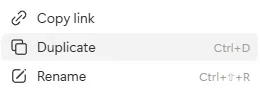
This is where everything lives. Duplicate the template and start tracking.
Key Properties to Track:
- Date & Time
- Content (full post text)
- Link to live post
- Views, Likes, Replies, Retweets, Bookmarks
- Tags (topic, campaign, format)
- Performance notes (your observations)
- Status (Draft, Published, Analysis Done)
The beauty? Need to find that post about content creation from July? Search "content creation" + filter by July. Want to compare all your threads? Filter by format = "thread." Looking for campaign posts? Tag = campaign name.
Everything is searchable. Everything is sorted. Everything is findable.
B. Content Ideas Database
Where ideas live BEFORE they become posts.
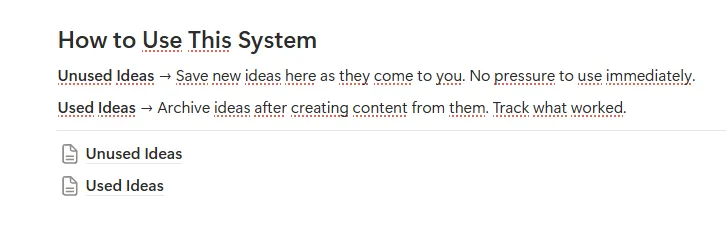
How it works: Just jot down your ideas. When you need them, you can look there (or your AI can — more on that later). Move to calendar when ready to create. When you use an idea but think it might be useful someday, copy it to Used Ideas.
No more "blank page syndrome." No more scrolling your timeline hoping for ideas. Your idea bank is always full. I have over 50 ideas in my content ideas bank, ready to be used when I need them.
C. The Workflow
Pick your style:
For Planners
Ideas → Calendar (as draft) → Publish → Wait 1-2 days → Add analytics
For Reactors
Publish → Wait 1-2 days → Add to Calendar with analytics
For Both: Calendar → Viral Library (for best performers)
Why wait 1-2 days for analytics? Most posts stop gaining significant traction after 48 hours. If you add analytics immediately, you're tracking incomplete data. If you wait 2 days, you get the real performance picture. Better for comparing posts accurately.
Get the Free Notion Templates
Content Calendar, Content Ideas, and Viral Post Library — everything you need.
Content Calendar → Content Ideas → Viral Post Library →Advanced: From Calendar to Viral Library
This is where it gets good. You now have two systems working together:
- Content Calendar = All your posts. Complete archive with basic analytics.
- Viral Library = Your best-performing content. Deep analysis of what actually works.
The workflow: Publish → Wait 2 days → Add to Calendar → Analyze performance → Top 10-20% go to Viral Library.
Two-Tier System Benefits:
- Never lose track of winners
- Study your own patterns (not just generic advice)
- Create case studies from your content
- Reference when creating new content
- Build authority by understanding YOUR audience
Calendar tracks everything. Library studies the best. Together? You're building an intelligence system.
Real Talk: Do You Actually Need This?
Let's be honest. Not everyone needs a content calendar.
You DON'T Need This If:
- You post 2-3 times per week (easy to remember what you posted)
- You never reference old content (you're purely forward-focused)
- You don't care about growth or optimization (posting for fun only)
- You're happy with random posting (no stress about consistency)
But You NEED This If:
- You post daily or near-daily (too much to track mentally)
- You run campaigns or launches (need planning and coordination)
- You want to learn what works for YOUR audience (data-driven growth)
- You hate the feeling of losing good content (like my story above)
- You reference your own posts often (building on previous content)
- You're building a content business (this is your operation system)
Choose what serves YOUR goals. Not what gurus say you should do. Not what works for someone with a different situation. What actually helps YOU create better content with less friction.
Bonus: How to Automate All of This
I will now tell you the secret of how to automate the entire process.
What you need:
- Access to Claude (subscription)
- Ready-made duplicates of the templates above
- Claude → Settings → Connectors → Find Notion → Add
Now Claude has access to your Notion and can create and update pages and databases. So you can quickly update your database.
How I do it: In Grok, I have set up a daily task to collect data about my posts. Here's the prompt I use:
List all posts (only posts, no replies) published on X by user [@USER] from the day before yesterday (example: if today is January 19, 2026, your goal is to display posts from January 17, 2026), following this schema:

For each post, provide:

**TITLE:** [Create a short descriptive title (3-5 words) based on the post content]

**FULL CONTENT:** [Complete text of the post, including all text, emojis, and line breaks exactly as posted. Do not use for articles.]

**POST URL:** [Direct link to the post: https://x.com/username/status/...]

**PUBLISH DATE:** [Date in format: YYYY-MM-DD]

**PUBLISH TIME:** [Time in 24h format: HH:MM]

**STATUS:** Published

**PLATFORM:** X/Twitter

**CONTENT TYPE:** [Choose ONE from: Short Tweet, Long Tweet, Short Thread, Long Thread, Quote Tweet, Reply, Poll]

**CATEGORY/PILLAR:** [Choose ONE from: Educational, Entertaining/Shitpost, Personal/Story, Alpha/Analysis, Community Building, Promotional]

**HOOK/FIRST LINE:** [The first sentence or opening line of the post]

**CTA (Call To Action):** [If the post has a CTA like "reply below", "follow for more", "RT if...", questions etc. - write it here. If none, write "None"]

**TAGS:** [Add relevant tags separated by commas, like: growth, content creation, web3, InfoFi, AI, lists, engagement, viral, etc.]

**MEDIA NEEDED:** [Choose from: None, Image, GIF, Video, Poll, Infographic, Screenshot]

**ENGAGEMENT METRICS:**
- Likes: [number]
- Replies: [number]
- Retweets: [number]
- Bookmarks: [number]
- Views: [number]

---

Separate each post with "---" and provide all posts in chronological order (oldest to newest).
Every morning, I copy the results from Grok and paste them into Claude with this prompt:
Add to my calendar in Notion (Content Calendar, link: [YOUR_NOTION_LINK]) the following posts with all the data. If some data is missing from the posted materials, try to infer it and add it to complete the table.Later, when it's ready, I just check that it has filled in the correct database and that it hasn't made any mistakes.
This is one of the basic uses of Notion + AI. There is much more to it, but you can learn about that in my course on creating content with AI, which will be released soon. If you don't want to miss its release, join my Discord or Telegram.
This Series So Far
AI Content Creator Series
- How to Set Your 2026 Goals and Achieve Them — direction
- Viral Post Library — research
- Content Calendar (this article) — execution
- AI Workflow (coming soon) — the 21-artifact system
- Notion Automation (coming soon) — tools that do the work for you
Each article builds on the previous one. Goals = direction. Library = research. Calendar = execution. The system is coming together.
More From Me
- The Hidden Psychology Behind Viral Content — why posts blow up
- 7 Growth Strategies for the New X Algorithm — how it actually works
- The Reply Guy Myth Just Died — Nikita Bier's algorithm tips
Each one gives you a different piece of the content creation puzzle.
If you build something cool with these templates, tag me (@pawnie_) — I want to see it.
Follow and notifications turned on?
If you don't want to miss out, you can join my Telegram channel or Discord. I'll post announcements there when new articles are published.